
What Is a Crypto Tax Calculator & How It Simplifies Crypto Tax Filing
How to Upload Your Transactions
Edit Transactions for Accurate Tax Calculation
Download Your Crypto Tax Report
Need Expert Help With Your Crypto Taxes?
FAQs
 Part of a series

A crypto tax calculator is a tool that helps you accurately calculate taxes on your crypto transactions in compliance with Indian tax regulations. Instead of manually tracking trades across multiple exchanges and wallets, a crypto tax calculator automatically consolidates your transaction data and applies the correct tax rules in one place.
With a crypto tax calculator, you can:
Accurate transaction data is essential for crypto tax compliance, as even small errors can lead to incorrect tax reporting. A reliable crypto tax calculator ensures every buy, sell, transfer, and trade is accounted for correctly.
India Crypto Research’s Crypto Tax Calculator is built to simplify this entire process. By syncing your exchanges and wallets, the platform automatically processes your transaction history, calculates taxes, and generates ready-to-use tax reports—making crypto tax filing simple, accurate, and stress-free.
To get started, open the India Crypto Research website and navigate to Tax Calculator & Portfolio Analysis from the top menu.

Once the page opens:
Register your account by:
After completing the registration process, your account will be successfully created, and you’ll be ready to start adding exchanges and wallets to track your crypto portfolio and calculate taxes accurately.
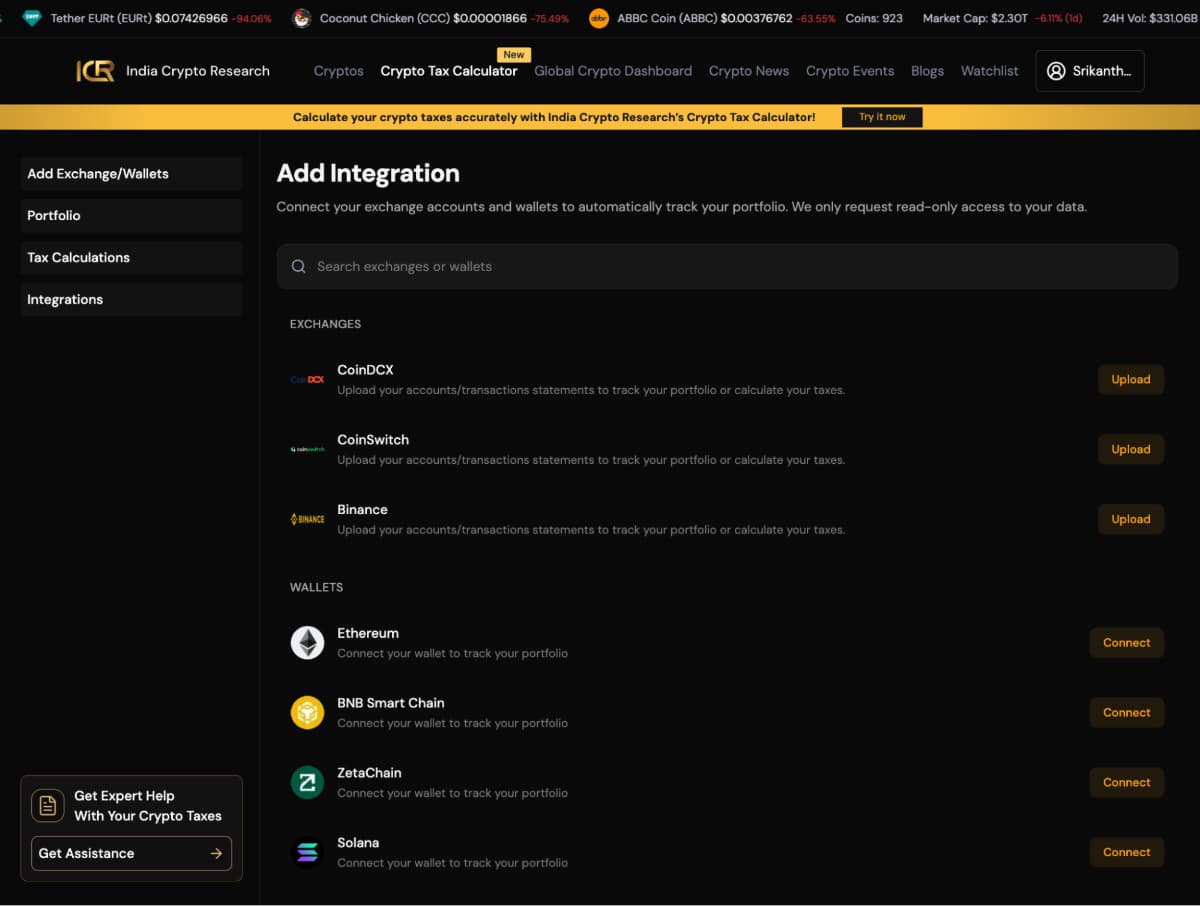
After creating your account, the next step is to connect your exchanges and wallets so your crypto portfolio can be tracked automatically.
On the Add Integration page, you can search for your exchange or wallet and connect it to your account. India Crypto Research only requests read-only access, which means your funds remain completely safe, and no transactions can be performed on your behalf.
Once you select an exchange, you’ll be redirected to the Add Exchange Integration screen. This is where you upload your transaction history so the platform can accurately calculate your crypto taxes.
Start by entering a wallet name (for example, My Main Wallet or CoinDCX Trading Account). This helps you easily identify different exchanges or wallets inside your account.
Next, upload your transaction file by dragging and dropping the file or clicking to browse. The platform supports CSV and XLSX formats.
You can also add on-chain wallets such as Ethereum, BNB Smart Chain, Bitcoin, and Solana without uploading any files.
How wallet integration works:
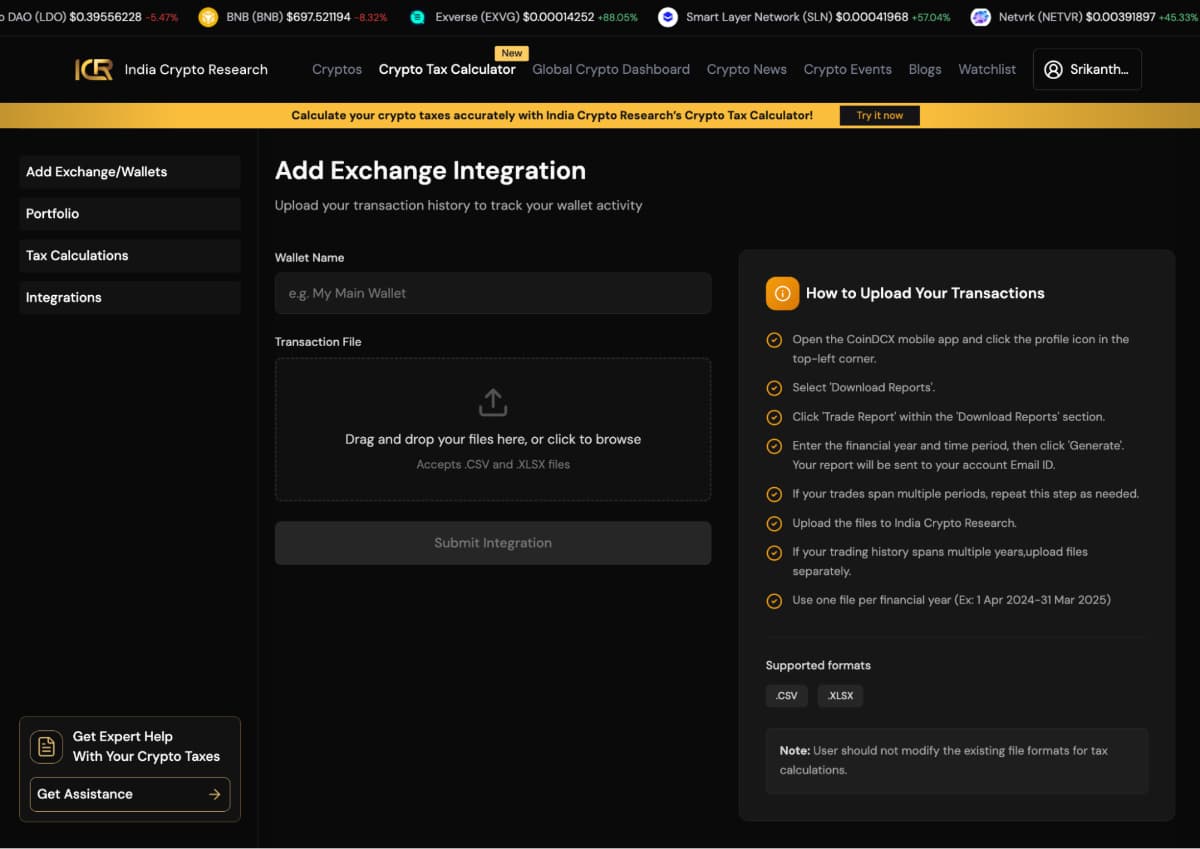
Follow these general steps to download and upload your exchange transaction history:
Note: The location and naming of the report download option may vary across exchanges.
1. Upload one file per financial year (e.g., 1 April 2024 – 31 March 2025) 2. If your trading history spans multiple years, upload files separately 3. Do not modify the file format, as it may affect tax calculations important
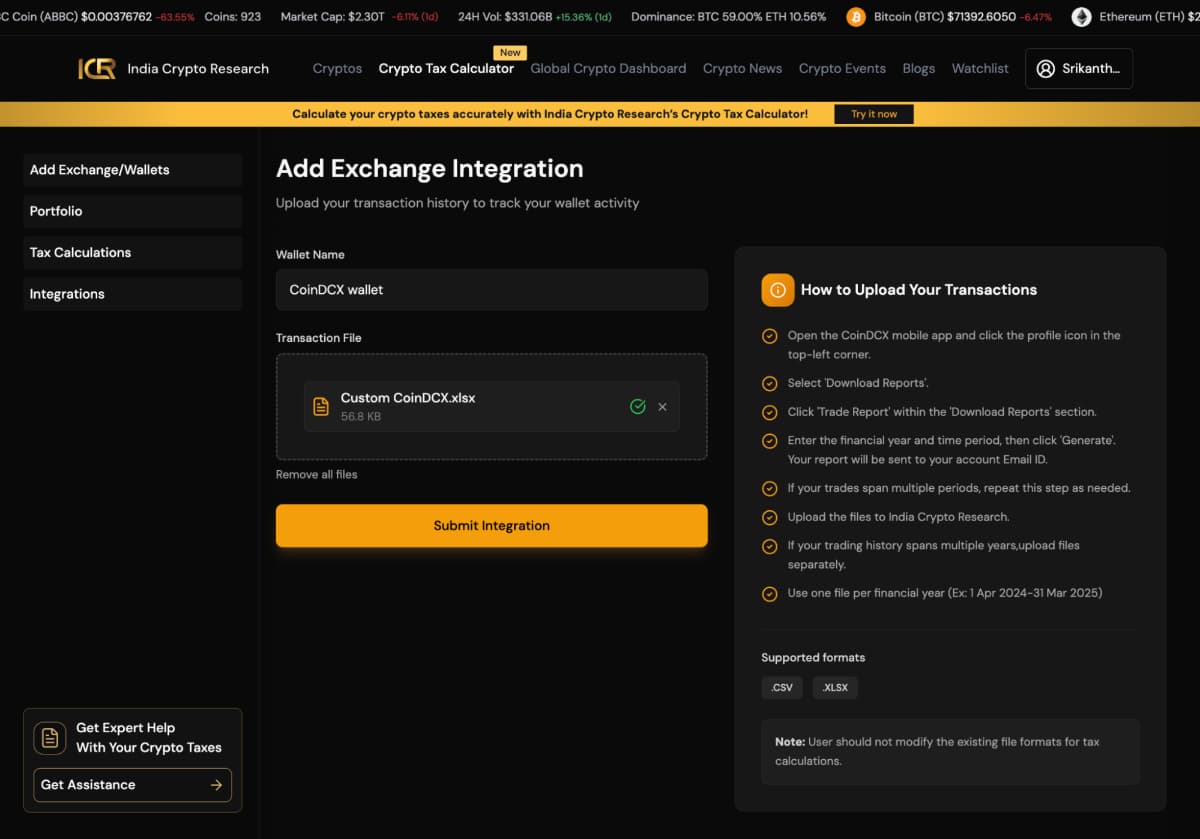
Once the file is uploaded, click Submit Integration to complete the process.
Once you submit your exchange or wallet integration, the platform automatically processes your data and builds your crypto portfolio tracker dashboard.
Here, you can see a complete overview of your crypto investments, including:
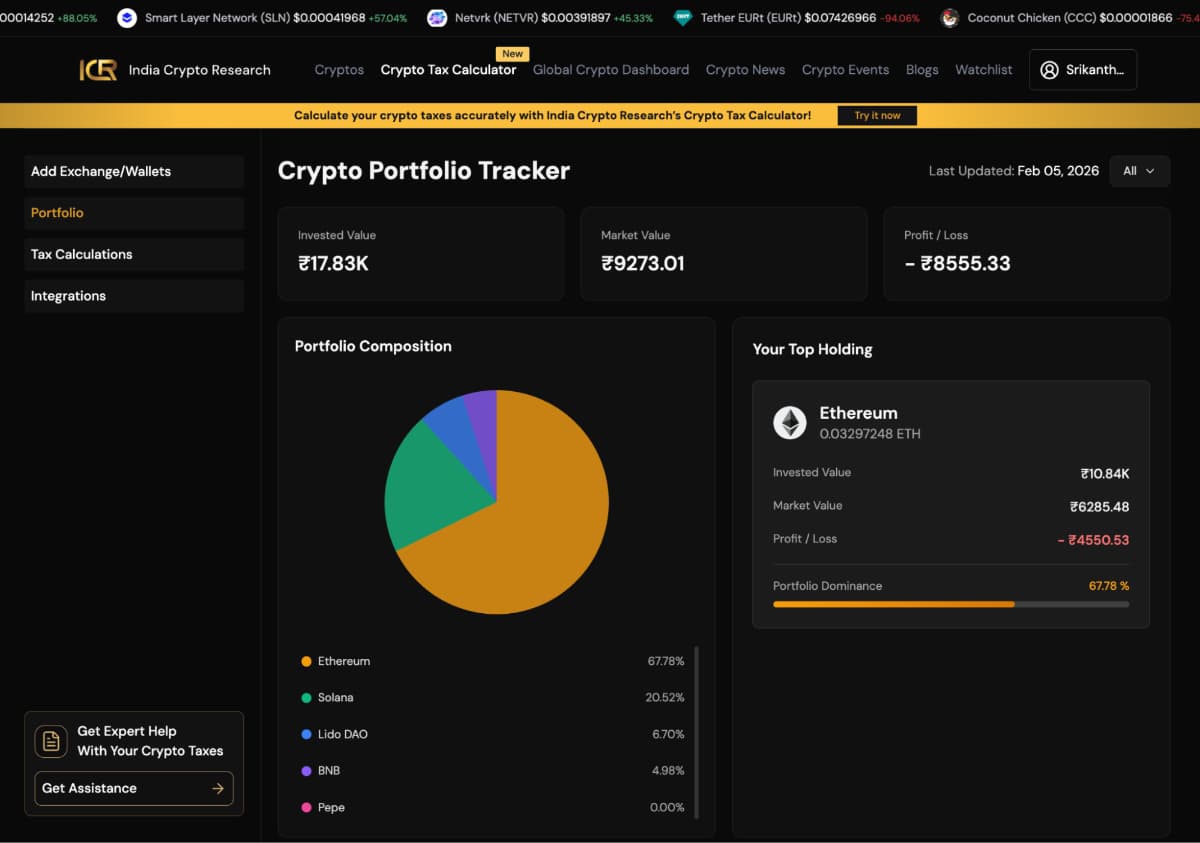
The portfolio composition chart helps you understand how your investments are distributed across assets like Bitcoin, Ethereum, Solana, and more. This makes it easier to analyse diversification and identify overexposure to any single asset.
Once your portfolio is synced, you can navigate to different sections of the platform based on what you want to analyse. To view your tax details, click on Tax Calculations from the left-hand menu.
The Tax Calculations section gives you a complete, year-wise breakdown of your crypto taxes in one place. You can select the financial year you want to review and instantly see:
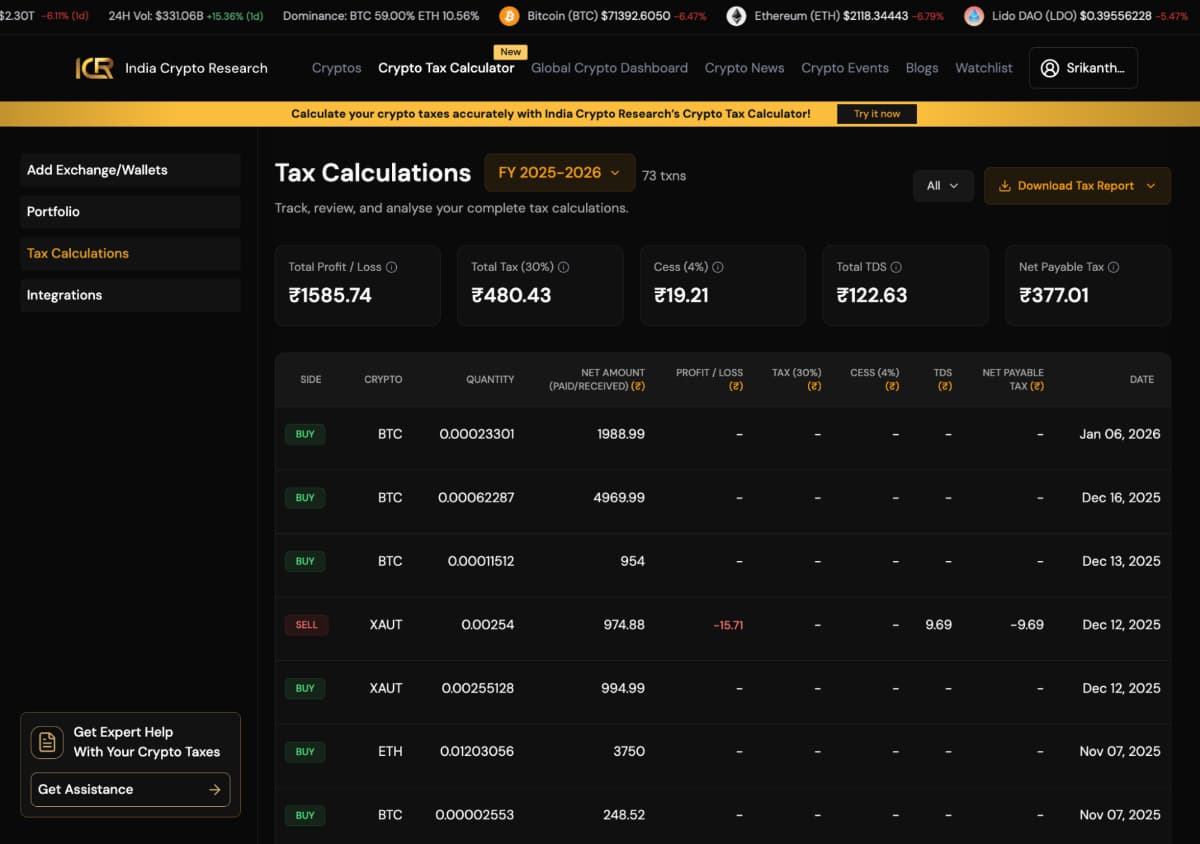
Below the summary, you’ll find a detailed transaction-wise table that shows:
This detailed view ensures complete transparency and helps you understand exactly how your crypto tax liability is calculated for the selected financial year.
If you notice any missing or incorrect values, you can manually edit transaction details directly from this section. This allows you to:
Making these adjustments ensures your profit and tax calculations remain accurate before downloading your final tax report.
Once you’ve reviewed your tax calculations, you can easily download your crypto tax report by clicking on the Download Tax Report button at the top-right corner of the screen.

The downloaded report contains:
This report can be used directly for income tax filing or shared with your accountant or CA, making crypto tax compliance simple and stress-free.
After adding your exchanges and wallets, you can manage all your connections from the Integrations section in the left-hand menu.
This page displays a summary of all your connected exchanges and wallets, including:
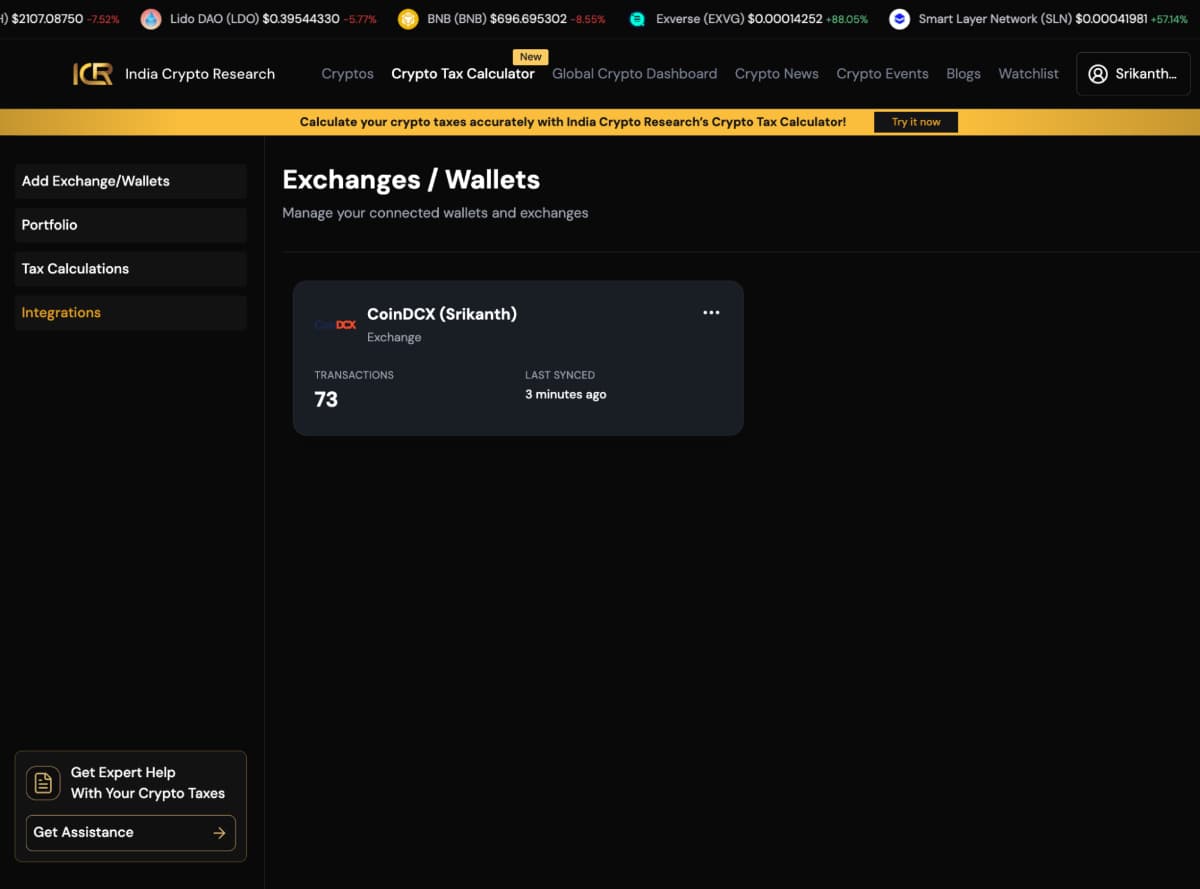
From the Integrations section, you can:
This section helps you ensure that all your data is properly connected, keeping your portfolio tracking and tax calculations accurate.
If you want personalised assistance with your crypto taxes, you can click on the Get Assistance button located at the bottom-left corner of the screen.
This allows you to connect with crypto tax experts who can:
This option is ideal if you prefer professional guidance or have complex crypto activity.

With this, you can confidently track your crypto portfolio, manage integrations, and stay compliant with your crypto tax obligations all in one place.
India Crypto Research operates independently. The information presented herein is intended solely for educational and informational purposes and should not be construed as financial advice. Before making any financial decisions, it's essential to undertake your own thorough research and analysis. If you're uncertain about any financial matters, we strongly recommend seeking guidance from an impartial financial advisor.


